Using PayPal for checkout
In this article:
My customer's order is Pending
What info do customers see from PayPal?
PayPal checkout
Important! PayPal checkout options are limited for the (TRY) Turkish Lira and (INR) Indian Rupiah.
PayPal checkout will allow your customers to purchase using:
- PayPal account
- Local Payment Methods for Europe
- Debit or Credit card

Local Payments Methods will be offered to customers depending on their location. For example, customers in the Netherlands will be able to checkout with iDEAL or SOFORT, while customers in Germany can pay using Giropay.
These Local Payment Methods include:
- Bancontact
- BLIK
- eps
- giropay
- iDEAL
- MyBank
- Przelewy24
- SOFORT
You can sell with either a Business or Personal PayPal account. But, to connect the PayPal checkout in your store, you need to have a verified PayPal account.
How to connect PayPal
- Navigate to Store Settings > Payment options
- Click Connect with PayPal
-
Enter your PayPal email address and select Next
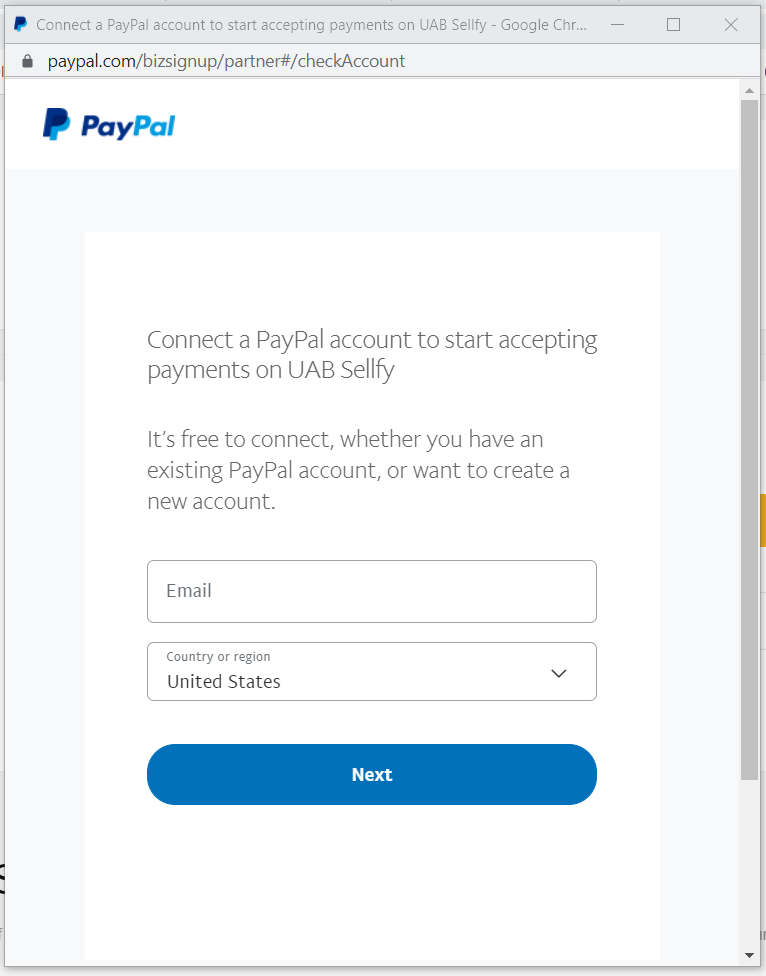
- Log into your PayPal account
-
Choose to use your account as a Personal account or as a Business account and then press Next
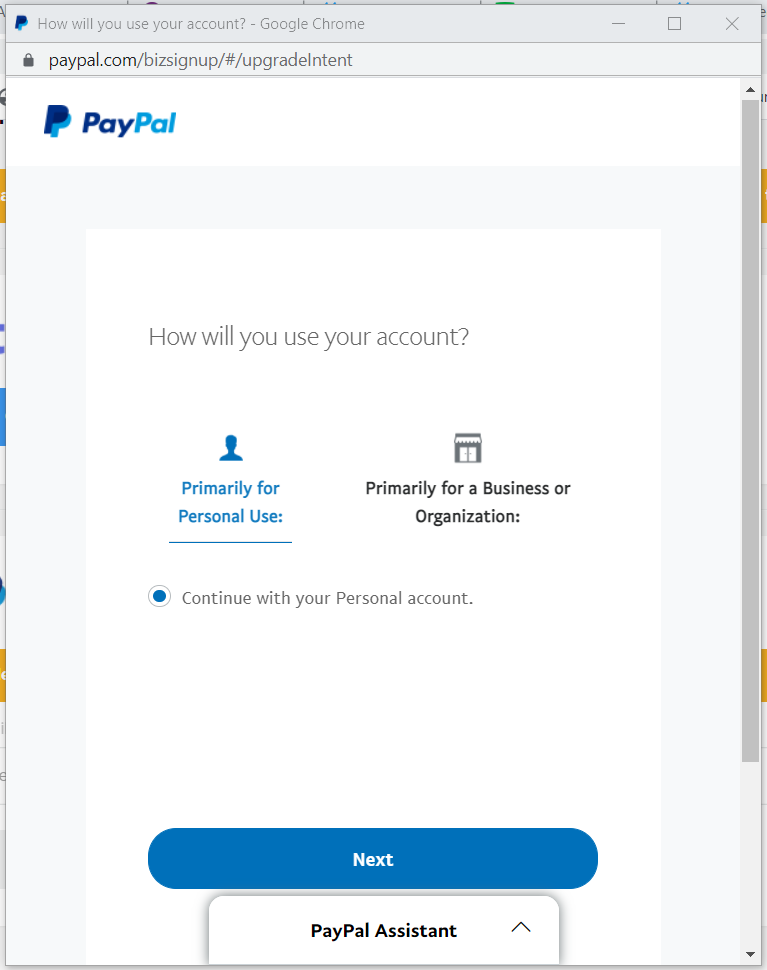
-
You will see that your account is successfully connected
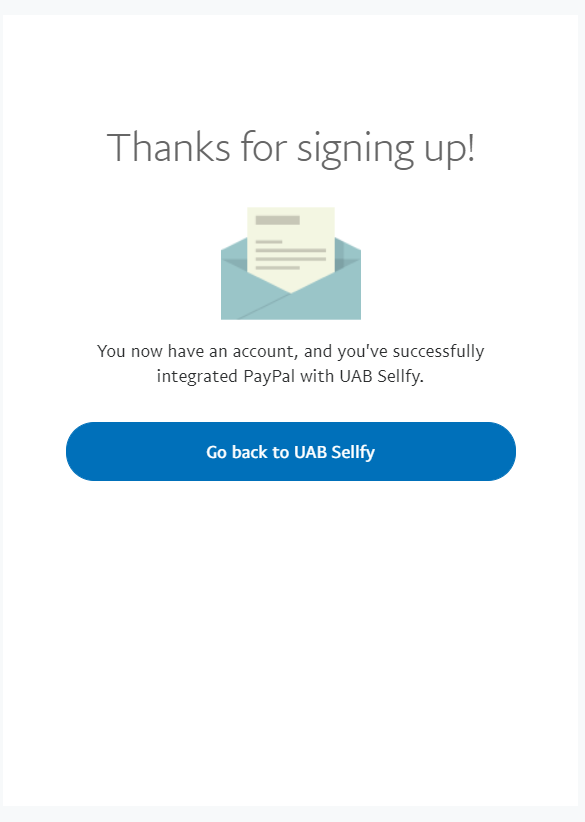
- Select Go back to UAB Sellfy
After connecting your PayPal checkout will be enabled (unless you are using the free trial) and customers can purchase with their PayPal account or through PayPal's guest checkout option. You'll receive these payments in your PayPal account.
PayPal's Pay Later option
The Pay Later option offers short-term, interest-free payments for customers using PayPal for checkout.
You receive the full payment immediately, while your buyers pay over time in four installments. After their initial payment, the remaining three payments are automated. Pay Later offers are included with PayPal Checkout at no additional cost to you.
Read here for more information.
My customer's order is Pending
Important! Sellfy does not process payments. Issues with pending orders must be resolved with PayPal. You can use this checklist for troubleshooting but we recommend contacting PayPal.
Refunds and disputes
All customer refunds will be issued by you, within PayPal. If it's been 180 days or less, you can issue a refund by the following steps.
- Go to Activity.
- Click the transaction you want to refund and then click Refund this payment.
- For 'Refund amount', enter the amount you want to refund, (you may have the option to refund a partial amount of the payment) and click Continue.
- Review your information to make sure you entered the correct refund amount and click Issue Refund.
For more help, you can read here on PayPal's site.
If you have a PayPal order that's disputed, Sellfy provides order information that you can use as supporting evidence.
With each order you will see email delivery status (including open and click) and digital file access attempts. This will show if the customer has attempted to download product files prior to requesting a refund.
Downloading the order will also give you an IP address used for the digital file access.
What info do customers see from PayPal?
If a customer is using PayPal for checkout, they may be able to see the following personal information after the payment is confirmed:
- Name or Business name
- PayPal email address
- Phone number
FAQ
Q: Do I need a Business account with PayPal to sell?
A: No, you don't need to have a Business account. You can sell through PayPal using a Personal account. Though, if you plan to sell subscriptions specifically, PayPal will require that you have a Business account.
Q: Are there fees on sales?
A: There are no fees charged by Sellfy, just the monthly or yearly payment for your plan. However, PayPal does charge a processing fee on each transaction. On average, this cost is 2.9% + 30¢ per transaction.
Q: When do I get paid?
A: You'll get paid nearly instantly. Your money will be deposited directly into your connected PayPal account right after the customer completes their purchase. (Note: if your PayPal account is brand new, PayPal may temporarily slow the deposit of your first few transactions for security purposes).
Q: Can I process refunds through Sellfy if they paid via PayPal?
A: Sellfy does not process transactions or refunds directly. To refund a customer who paid via PayPal, you will need to log into your PayPal account, locate the specific transaction, and issue the refund directly from there.
Q: Will customers need a PayPal account to buy from me?
A: Nope! While they can easily check out using their PayPal account, PayPal also allows customers to check out using a major credit/debit card as a "Guest", or by using local European payment options like iDEAL or giropay depending on their location.